


Let me start by recommending that if budgets allow website content creation should be done by a professional.
There is a misconception that just because you can write reports, marketing material or business documents, that this somehow makes you qualified to write for the web. It does not. Not every good writer can write for the web.
In a previous post, I shared 7 ways a great copywriter crafts compelling web copy, much of which you will only learn through experience.
That said, I am a pragmatist and recognise that not all of us can pay a professional copywriter. On top of which, there are times when the individual behind the site should let their personality shine through. In such situations, it makes more sense for that person to write their copy.
So, if you are in a position where you have to write the copy for your website, how can you ensure it is as good as possible? Well, the first step is to understand where things typically go wrong.
- Why Most Approach Website Content Creation Wrong
- 1. Create Your Value Proposition
- 2. Pinpoint Your User’s Objections
- 3. Understand Your Audiences Questions
- 4. Identify People’s Top Tasks
- 5. Organise Your Website Content Components
- 6. Build and Test Your Website Content’s Structure
- 7. Create Your Initial Draft Content for Your Website
- 8. Edit and Refine Your Website Content
- 9. Test Your Final Website Content
- 10. Monitor and Refine the Content of Your Website
- Website Content Creation Is About Interaction
Why Most Approach Website Content Creation Wrong
Those with less experience creating website content tend to make four mistakes:
- They start from the wrong premise.
- They assume their audience think like they do.
- They fail to test and refine their copy.
- They are overwhelmed by the task.
Let’s look at these in a little more depth.
They Start From the Wrong Premise
When people start thinking about the content for the website, they begin by asking themselves “what do I want to say“, rather than asking themselves “what does my audience want to know“.
Although what you want to say does matter. It matters less than answering the questions your audience has about your product or service.
The fact that people are on your site means they have already expressed some interest in what you have to offer. Your job is now to address any objections or concerns they may have in the website’s content.
They Assume Their Audience Is Like Them
Another common mistake is that we tend to write the content for our websites as if we are writing for ourselves. That is dangerous because most of those writing website content are experts in the subjects they are writing about.
The more you know about a topic, the further your perception of the subject differs from the majority of people. You make presumptions about your audience’s level of knowledge that is often not reflective of the truth.
For example, we often make the mistake of using terminology and structuring information in ways that make little sense to our audience.
They Fail to Test and Refine Their Copy
Then there is our tendency to create the content for our websites and walk away. That is particularly dangerous as no website content is going to be perfect the first time. There is always room to optimise it.
Without testing, you will almost certainly poorly structure your website’s content or leave users with entirely the wrong impression about your offering.
They Are Overwhelmed by the Task
However, probably the biggest problem is that people feel utterly overwhelmed by the challenge. To be honest, if you do not, then you are massively underestimating the size of the task ahead of you. Website content creation is a large and intimidating job.
Those that feel overwhelmed become tempted to simply migrate their old content across to the new website, but as I have said before, this is madness.
One thing that can help with this feeling of being overwhelmed is to have a robust workflow for creating the content. That is why I have created a ten-step process that I use when writing content for websites. Hopefully, it will help you too.
1. Create Your Value Proposition
Earlier I suggested we often start from the wrong premise with website content creation. I encouraged you to ask what questions the user has when they come to your website.
Well, the first three questions almost all users have when arriving on a new website are:
- What does this website offer?
- How does that help me?
- How does it deliver those benefits?
Of course, they are not necessarily conscious of those questions, but they are there, and we need to address them in our website content.
That is where your value proposition comes in.
I recently wrote about the need for us to establish a value proposition so I will not repeat myself here. However, I will say that your website content needs:
- A strapline that summarises your offering.
- A list of benefits your offering provides your audience.
- Explanation of how your offering delivers those benefits.
Creating this value proposition is always a good starting point in website content creation. You don’t necessarily need a final version or even a full draft. However, you should at least create an outline before proceeding to step two.
2. Pinpoint Your User’s Objections
With your value proposition outline in hand, you now need to consider what objections or concerns users might have to your value proposition.
Write a list of every objection a person might have that would prevent them from taking action on your website.
To create this list, I recommend talking to customer-facing staff. However, I would also encourage you to run a single question survey on your existing website saying something like:
If you decided not to contact us today, it would be useful to know why.
If your call to action is not “contact us“, then you can change it to whatever is relevant.

You can then list common reasons why they might not, but also allow them an open field to add others.
That survey will allow you to identify not only all of the objections but also get a sense of which reasons are most pressing based on the number of votes.
You can also use a similar approach when gathering audience questions.
3. Understand Your Audiences Questions
A user doesn’t just come to a website with those three questions I mentioned earlier. Collectively they could be arriving with dozens (if not hundreds) of questions they want answering.
If we know what these questions are, our website content will then be much more relevant to the user’s needs. We will also find them an excellent starting point for writing content, making the whole process less intimidating.
To find out what these questions are, we can simply ask users of your existing website. All you need is a simple survey question, such as:
What question did you most this website to answer?

Also, you can talk to those customer-facing staff again. Salespeople and customer support teams will certainly have no shortage of questions they get asked regularly.
You can also get further inspiration by looking at search terms, dwell time on existing content and what questions people are asking online more generally.
4. Identify People’s Top Tasks
As with objections, not all the questions people ask will be of equal importance. We must discover which questions are the most critical to address. Otherwise, users will struggle to find their answer among the plethora of information.
To do this, we can carry out something called a Top Task Analysis.
Top Task Analysis is an approach developed by Gerry McGovern designed to identify the tasks that a user most cares about completing on a website.
Gerry defines a task very broadly, including questions that people want answering or objections they have that they wish to address before proceeding.
I won’t go into massive detail about the process of uncovering top tasks as Gerry does that exceptionally well himself. However, the process involves collecting tasks and then surveying users to discover which tasks are most important to people.
Users are presented with a long list of tasks and asked to prioritise the top five tasks that are most important to them.
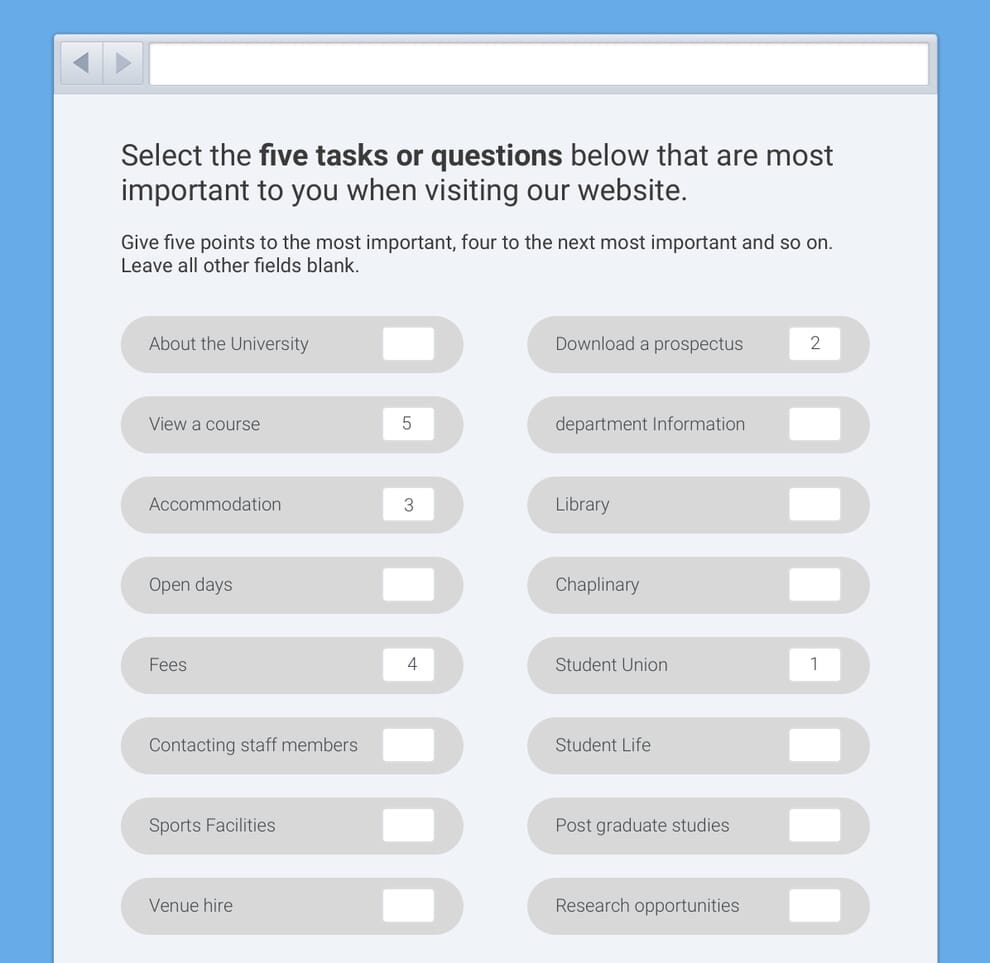
By doing this exercise, we can identify which questions (tasks) matter the most to people and that allows us to focus our website content around these.
An alternative to a top task analysis would be to run a survey asking people to propose questions, just like earlier. However, instead of only gathering answers, the survey would also allow people to vote up other people’s suggestions at the same time. That will give you an indication of the top questions without the need to do a full top task analysis.
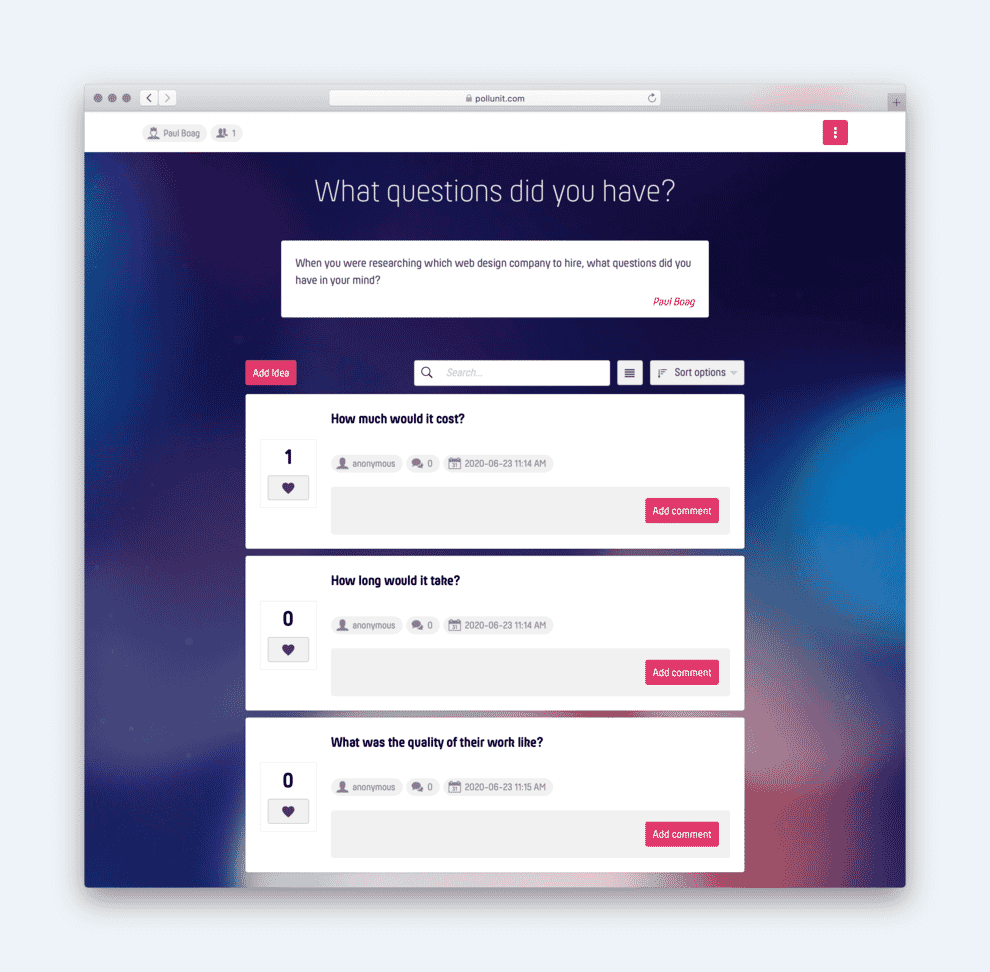
The approach you should adopt will be dependant on time and budget. However, knowing what website content is most important to users is crucial for organising your content.
5. Organise Your Website Content Components
Website content creation is not just about writing content. It is also about organising the website content in a way that enables users to find what they are looking for.
By this stage in the content creation process, we have a substantial number of content areas we need to address. We have lists of:
- Benefits.
- Features.
- Objections.
- Questions.
It would be all too easy to create a structure that makes it impossibly hard for somebody to find the answer to their specific question.
To overcome that problem, we need to organise our website content in a way that matches how our audience thinks.
I have written before about how to decide on your site’s information architecture and structure it around the user’s mental models. However, the critical component of that process is card sorting.
In essence, we take our list of benefits, features, objections and questions. Then we extract a total of approximately 30 items from that list based on their importance to users.
In card sorting, we put each list item on a separate card and give the cards to users. We then ask the users to group those cards in any way that makes sense to them.
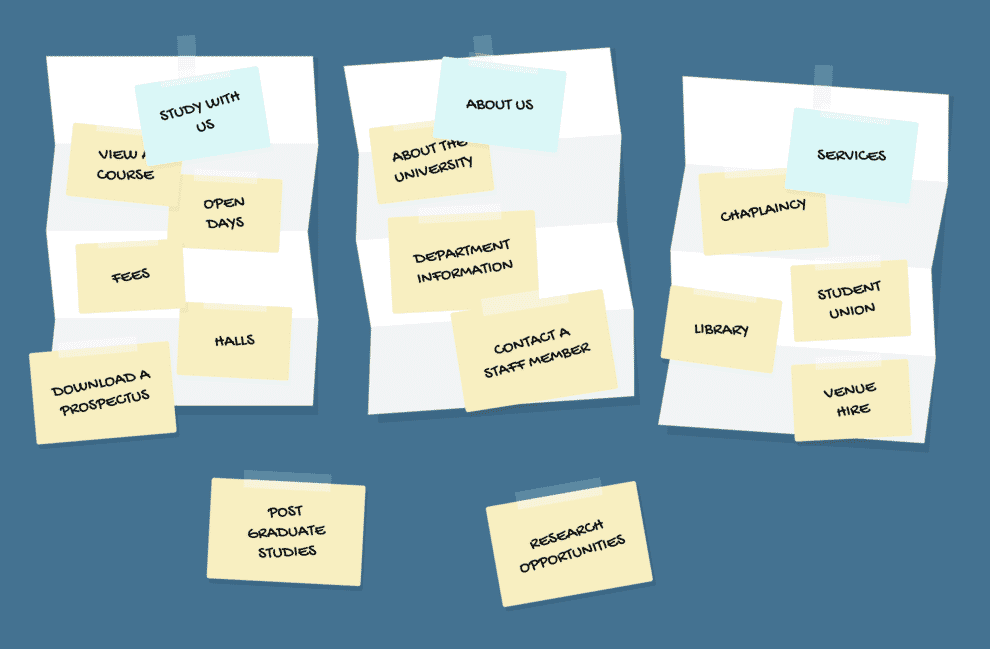
Finally, we ask each participant to label each group of cards with a title that seems appropriate.
Carrying out this exercise allows us to start building an information architecture to organise our website content.
We can take the exercise further, once we have our top-level sections, by asking users to organise the remaining list items (that we didn’t use in the initial testing) into our categories.
Fortunately, there are some great tools out there like UXOps, that allow us to carry out this entire card sorting exercise online and that help us understand the results we get back.

By the end of the card sorting exercise, you will now have a site structure. That is where things get interesting.
6. Build and Test Your Website Content’s Structure
At this point, I usually start creating a clickable prototype of my website. In some cases, I do this on a fresh content management system installation. Where that is not possible, I use a tool like Notion to allow me to start organising my content into something I can click between pages using.

On each page, I start adding bullet points outlining whatever benefits, features, objections or questions the page will eventually answer.
If time allows, this gives me something tangible I can test with users. I can ask users to find the answer to a particular question or objection and watch what happens. Can they work out where the relevant information is, and successfully navigate there? If so, did they use the most direct route, and how much did they need to think about it?
However, there is another advantage to this approach.
7. Create Your Initial Draft Content for Your Website
A clickable prototype provides the content creator with a starting point for drafting the site’s content. They can see other pages the user will likely come from. They will also be able to view pages the user might go to from there.
However, most critically, they will have a list of questions, objections, features and benefits that they need to address in the content of the pages.
Given time and budget, I like to start with bullet pointing my answers to each question or objection, rather than diving straight into writing the full content.
That allows me to go back to users again and see how they respond to the answers I am providing before I spend too long creating the website content in full.

However, whether you bullet point first or not, the next step is to start drafting the content for each page.
What I would recommend is avoiding trying to make the website content for each page perfect before moving on to the next. The problem with this approach is that you may find you need to move or restructure content based on user feedback. That is harder to do if the material has been heavily edited and refined.
Instead, I add layers of fidelity to copy with each pass across the site. For example, I start by just listing the content to be addressed. Then I bullet point details on each area, before moving on to write an initial draft.
Only after I have written an initial draft of all the website content, do I then look at editing and refining it still further.
8. Edit and Refine Your Website Content
The editing phase in my website content creation process consists of three steps.
- I pass my website content through Grammarly to correct any spelling or grammar mistakes.
- I read the content back out loud to make sure the tone feels conversational and engaging.
- I look through the copy seeking out opportunities to aid scannability by adding headings, imagery, pull out quotes etc.
It helps when editing website content to have a content style guide to hand to ensure you write in the correct tone of voice.
At the very least, have a clear picture of what kind of tone of voice you are going for. For example, are you trying to be professional or approachable?
It is then worth testing to see if you have achieved this.
9. Test Your Final Website Content
The last stage in website content creation before you launch is to test your copy once again.
Last time we tested, the emphasis was on information architecture. However, this time around, we will also be checking the page visual hierarchy.
In other words, we need to ascertain whether a user can find the specific answer to their particular question in a page of text or whether it has been lost amongst the noise on the page.
We can do this with a simple usability test where we pay particular attention to how long it takes them to find the answer to our test question. You could even use a tool like Maze to gather quantitive data on time to complete the task.

The other thing we want to test is whether the tone of voice of the copy matches the personality you want to communicate. For example, let’s imagine you want to come across as friendly. You can simply ask participants:
On a scale of 1-5 how strongly do you agree with the statement; “this company seems friendly” after reading the site copy.
Once you have carried out this final round of testing and addressed any issues, you can launch the website. However, that doesn’t mean the website content creation process is over.
10. Monitor and Refine the Content of Your Website
One of the biggest mistakes you can make is to launch your website content and then abandon it. There is so much opportunity to improve your website content once the site is live, and you begin to gather real data about how people are interacting with it.
For example, Google Analytics may show that a lot of people abandon the website on a particular page. Perhaps some aspect of the content is putting them off.
Alternatively, heat map software like Hotjar could show that users are scrolling past critical content and so that webpage needs to be rewritten to place the essential content higher on the page.
Then, of course, there is the opportunity to A/B test different content to see what performs best. We can improve everything from headings to calls to action by experimenting with various alternatives.

We can learn so much about what website content resonates with users once your site is live, that it would be madness to walk away.
Website Content Creation Is About Interaction
The big takeaway from this post should be that creating website content is not like writing for other mediums. Almost all other mediums are linear, while website content can be viewed in any order and so how users will respond is unpredictable.
To make matters worse according to research by the Nielsen Norman Group, users typically only read 28% of the content on a website, which is why scannability and writing style matter so much.
That is why the website content creation process has to involve a lot of testing and refinement. You cannot merely sit down and write a page of copy from beginning to end if you want people to take it in.
Ultimately, I advise most people to get a professional web copywriter to at least help them in the creation of their website content. It always strikes me as insane that people will spend a lot of money on the content management system and the design that holds the copy, but not on the content itself! That needs to change.


